nViPER — dual-panel file manager for Mac and Windows
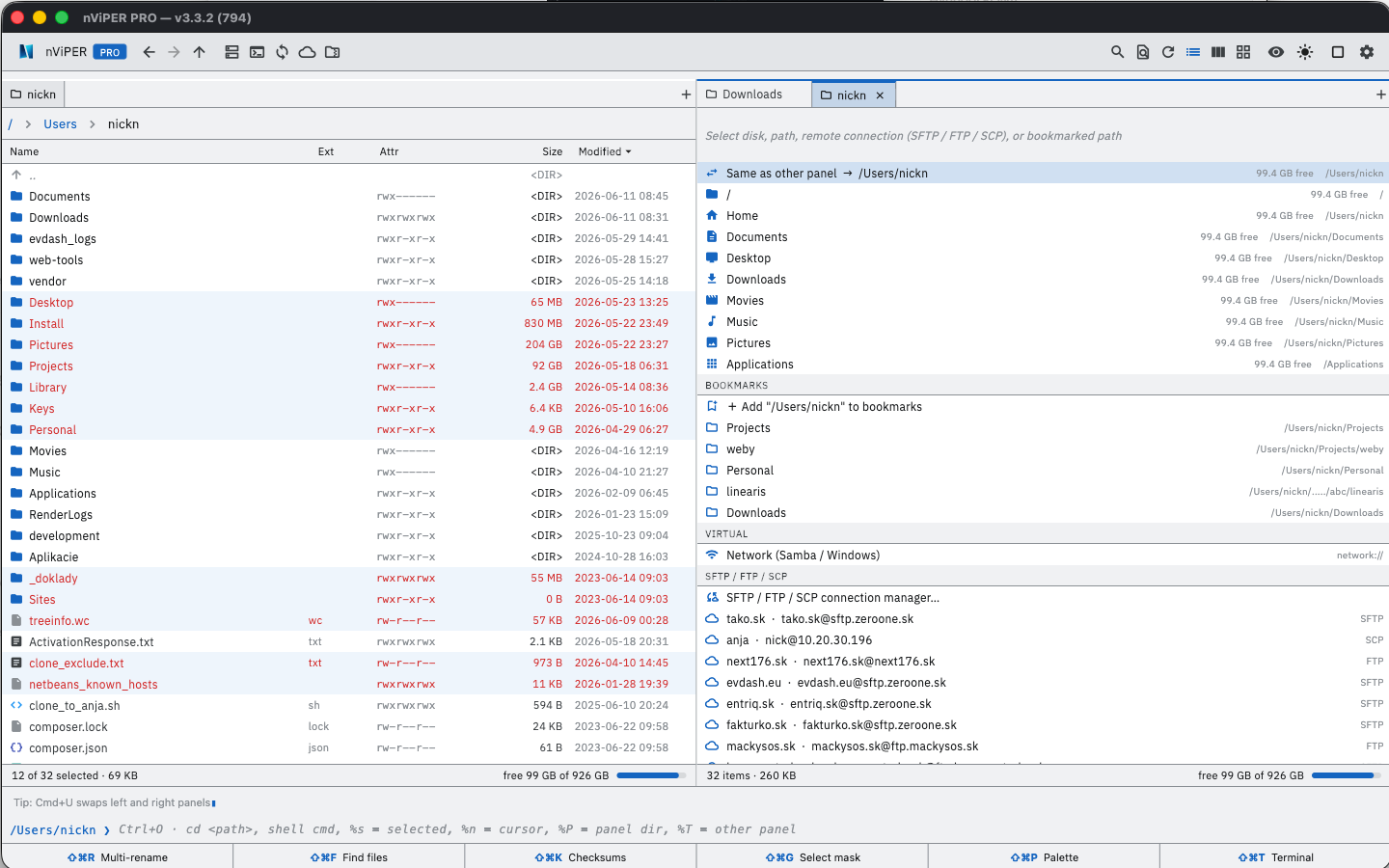
A fast, keyboard-driven file manager in the spirit of Total Commander — two panels, F-keys, tabs and the shortcuts people who have worked with two panels for years are used to. A modern reincarnation of the legendary nViPER@bOX from 2001 by the Slovak team NEXT17.
Windows: completely free — including all PRO features.
Mac: free on the Mac App Store, PRO features as a one-time €14.90 purchase (Family Sharing — one purchase for the whole family).
⬇ Mac App Store · ⬇ Microsoft Store · Windows installer · Portable ZIP
What's new in version 6.6.7
Version 6.6.7 brings video conversion on the Mac, sync that respects .gitignore with options as in rsync and lftp, selecting by mask with .gitignore, changes inside a line in Compare Files, merging folders like Total Commander and a viewer (F3) that works like the Lister. It is available in the Mac App Store and the Microsoft Store. Below, also what's new in versions 6.6 and 6.5.
- Convert images and videos — on the Mac, videos to MP4 (H.264 or HEVC), MOV or audio-only M4A, from 4K down to 480p, with or without the audio, through the Mac's own encoders; a video already in that format and size is just repackaged. For images, Max file size works together with the size options and the new Min. quality keeps photos sharp; on Windows, converting is many times faster. On the Mac, up to 5 files at a time without PRO. AV1 videos play with picture on Macs with M1, M2 and Intel too.
- Sync like rsync and lftp — Respect .gitignore leaves out what your project's .gitignore files list, on both sides, also with a server. New options: Left is the master, Keep newer on the right, Delete excluded on the right, and folder paths in the mask such as lib\3rd\. Folders left out are not listed on the server, so comparing is faster. Copy (F5) to a server keeps the file's date (SFTP, FTP, SCP), and a copy from server to server keeps its permissions.
- Select, compare and merge — Select by mask (Num+) with a mask history, Files, Folders or Both and .gitignore, and in the View menu Hide Ignored (.gitignore), like hidden files. Compare Files marks the changed characters or words inside a line, and F2 and Shift+F2 jump between the changes, also in files up to 100 MB. A folder copied onto a folder with the same name merges like in Total Commander, and on the Mac, Move with Replace puts the replaced file in the Trash, so Undo brings it back.
- Viewer and Total Commander habits — the viewer (F3) works like the Lister: search with Aa, whole words and RegEx, F2 reloads the file, W wraps lines. Rename a file with a slower second click, and Multi-rename knows [X] from the clipboard and [%VAR%]. Tabs inside archives from .tab files, the folder tree on Ctrl+Shift+F8, FTP favorites from wincmd.ini with their folder on the server, and F5 out of a ZIP or TAR shows progress for a single large file too.
- Sync with servers — Synchronize Directories works with a panel on SFTP, FTP, SCP, WebDAV or S3, and between two servers: it keeps file times, can compare by content and can mirror. Compare Files with a file on a server, and every save uploads it back unless it changed on the server in the meantime. FTP now works with servers that answered “500 Unknown command” (vsftpd, web hosting, routers, NAS). Files copied from a server keep their date from the server instead of today's. When a connection fails, Server log shows the exchange with the server to copy or save, and the WinSCP.ini import finds all connections.
- Folders, columns and links — folder column rules (with subfolders, separately for each panel), saved collections from the file collection that survive a restart, an optional folder tree, and in File, Links a hard link and editing a symbolic link's target, with Undo.
- Commands, network and cloud — on the Mac, the command line and user commands in the App Store version too (after a one-time permission), cd smb://server/share opens a network share right in the panel, and F3, F4 and Quick view download cloud-only files or tell you why they can't. Google Docs files open in your browser, on Mac and Windows.
- Phone and favorite applications — on Windows, an Android phone connected with File transfer appears in the drive bar and opens in the panel, with copying both ways, moving, deleting and renaming, no plugin needed. Drag the bottom edge of the toolbar to show favorite applications in more rows; on Windows you can also add them by dragging a program from File Explorer, and the connection import offers the wcx_ftp.ini from Total Commander, sftpplug.ini and WinSCP.ini it finds.
- Norton theme with the IBM VGA font — the Norton Commander look: the VGA font in the file lists and in the bars around them, its colors with the cyan cursor bar, and its F-key bar. The IBM VGA font can be picked in other themes too.
- New features — New file from template (text, Markdown, HTML, JSON or your own pattern, with date fields and Undo), named column sets, checking one pair by content in Synchronize Directories (SHA-256), a shorter context menu with More actions and Customize menu, Cloud folders (iCloud Drive, Dropbox, OneDrive) in disks and bookmarks. On Windows also a built-in terminal linked to the panel.
- Path bar, shortcuts and settings — click an empty spot in the path to edit and copy it as text, the dots open a menu of the hidden folders. Shortcuts accept F-keys too (such as F2 for Rename in place) and move a shortcut already in use to the new command. User command buttons on the toolbar, Total Commander import without duplicate buttons, tabs that scroll with the wheel or wrap onto more rows, smaller switches and a resizable Preferences window. On Windows, network drives also in nViPER run as administrator and better plugin support.
Why nViPER
- Keyboard first — F3 view, F4 edit, F5 copy, F6 move, F7 new folder, F8 delete, Tab between panels, quick search by typing.
- Total Commander habits — Ctrl+B branch view (all files from subfolders in one panel), locked tabs, subfolder menu in the path bar, multi-rename with [N], [C], [YMD] placeholders and file fields such as [=audio.Artist].
- Safe operations — Undo (Cmd/Ctrl+Z) for copy, move, rename and trash; Replace never deletes the original before the new file is in place.
- Native on both systems — Mac (Apple Silicon and Intel, macOS 12 or later) and Windows 10/11.
Features
- Panels: tabs, history, bookmarks, filter, detailed and brief view, thumbnails, folder sizes, synchronized browsing.
- F3 viewer: text, hex (even files over 2 GB), images including HEIC, PDF, syntax highlighting.
- F4 editor: keeps the encoding (UTF-8, CP1250, UTF-16), edits files directly on a server or inside an archive.
- Archives: open ZIP, TAR, GZ and BZ2 like folders; on Windows also 7z and RAR via 7-Zip.
- Remote connections: SFTP, SCP, FTP, FTPS, WebDAV and S3, sign-in with SSH keys (OpenSSH, PEM, PuTTY .ppk), Pageant or ssh-agent, import from WinSCP and Total Commander, copying between two servers; on Windows also file system plugins (WFX).
- Tools: multi-rename (with RegEx), file compare, folder sync, content search, checksums (MD5, SHA-256), split and combine, disk space cleanup.
- Customization: 13 themes including Total (bright) and Total (dark), custom keyboard shortcuts (PRO on Mac), 20 languages.
PRO on Mac — €14.90 one-time
The basic app is free and fully functional. PRO raises the limits and unlocks advanced tools. File comparison and folder sync are free. On Windows everything is free.
- Unlimited saved connections (free: 5)
- Multi-mask selection, e.g.
*.png;*.jpg - Advanced Find in Files — RegEx, multiple masks, search inside archives, unlimited results
- ZIP and GZ/TGZ compression (free: TAR)
- Image conversion — format, maximum size, quality and metadata, also in batches
- Color tags, keyboard shortcut editor and custom commands
One purchase covers the whole family via Family Sharing (up to 6 members).
Download
Windows — free, PRO included
macOS
On the Mac App Store — fully sandboxed, no tracking, no third parties. For macOS 12 or later, Apple Silicon and Intel.
History
The original nViPER@bOX was published in 2001 in the Slovak magazine FreeSoft — a 970 KB Win32 Delphi binary by the NEXT17 team. 25 years later comes this modern reincarnation built with Flutter, for the Mac App Store and the Microsoft Store.
Contact
Questions, feedback, technical support: nviper@next176.sk
News and tips: nViPER file manager on Facebook
Privacy: next176.sk/nviper/privacy