nViPER — dual-panel file manager for Mac and Windows

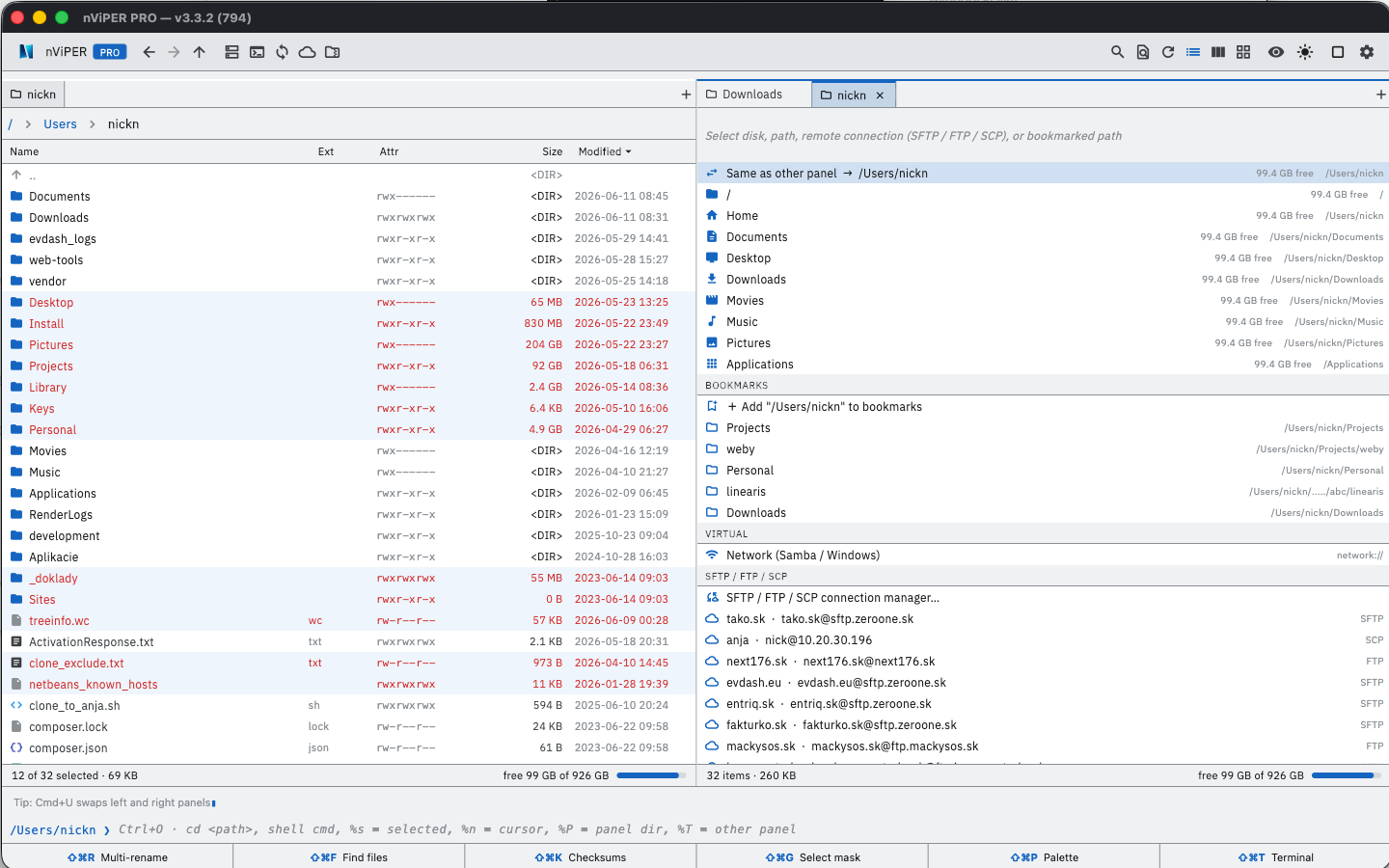
A fast, keyboard-driven file manager in the spirit of Total Commander — two panels, F-keys, tabs and the shortcuts people who have worked with two panels for years are used to. A modern reincarnation of the legendary nViPER@bOX from 2001 by the Slovak team NEXT17.

nviper-mac-01.png

Windows: completely free — including all PRO features.
Mac: free on the Mac App Store, PRO features as a one-time €14.90 purchase (Family Sharing — one purchase for the whole family).

⬇ Mac App Store  ·  ⬇ Microsoft Store  ·  Windows installer  ·  Portable ZIP

What's new in version 6.0.0

A major new version: several windows at once, workspaces, S3 storage and an adjustable toolbar and columns. Available now on Windows; on Mac it is in beta testing and coming to the Mac App Store soon.

  • Multiple main windows — each window has its own panels, tabs and history, and all of them come back after a restart. On Mac: Window menu, Cmd+` switching and dragging a tab into another window (hold Option to copy).
  • Workspaces — save the whole set of windows and tabs under a name and open it again any time.
  • S3 compatible storage next to SFTP, FTP, SCP and WebDAV — browse, upload, download, rename and delete; an interrupted large upload can be resumed.
  • Adjustable columns — drag a column border to change its width, double-click to fit the content. New Kind and Created columns, on Mac also Last opened and Date added.
  • Your own toolbar — reorder buttons by dragging, hide or show them; right-click the toolbar to open the editor.
  • Keyboard shortcut editor — 63 commands, search and a second shortcut for every command (PRO on Mac).
  • Windows: Total Commander plugins — WCX packer plugins (read-only) and WDX content plugins run in a separate process, so a faulty plugin cannot bring nViPER down. Folders with tens of thousands of files open many times faster.
  • Mac: Finder Services and aliases — open a folder or file from Finder in a nViPER tab or new window via the Services menu; File → Create Finder alias.
  • Also new since 5.1.1: image conversion (format, quality, size; PRO on Mac), audio and video playback in the quick view and F3, slideshow, compact layout and a Total Commander-style status line.

Why nViPER

  • Keyboard first — F3 view, F4 edit, F5 copy, F6 move, F7 new folder, F8 delete, Tab between panels, quick search by typing.
  • Total Commander habits — Ctrl+B branch view (all files from subfolders in one panel), locked tabs, subfolder menu in the path bar, multi-rename with [N], [C], [YMD] placeholders.
  • Safe operations — Undo (Cmd/Ctrl+Z) for copy, move, rename and trash; Replace never deletes the original before the new file is in place.
  • Native on both systems — Mac (Apple Silicon and Intel, macOS 12 or later) and Windows 10/11.

Features

  • Panels: tabs, history, bookmarks, filter, detailed and brief view, thumbnails, folder sizes, synchronized browsing.
  • F3 viewer: text, hex (even files over 2 GB), images including HEIC, PDF, syntax highlighting.
  • F4 editor: keeps the encoding (UTF-8, CP1250, UTF-16), edits files directly on a server or inside an archive.
  • Archives: open ZIP, TAR, GZ and BZ2 like folders; on Windows also 7z and RAR via 7-Zip.
  • Remote connections: SFTP, SCP, FTP, FTPS and WebDAV, import from WinSCP and Total Commander, copying between two servers.
  • Tools: multi-rename (with RegEx), file compare, folder sync, content search, checksums (MD5, SHA-256), split and combine, disk space cleanup.
  • Customization: 13 themes including Total (bright) and Total (dark), custom keyboard shortcuts (PRO on Mac), 20 languages.

PRO on Mac — €14.90 one-time

The basic app is free and fully functional. PRO raises the limits and unlocks advanced tools. File comparison and folder sync are free. On Windows everything is free.

  • Unlimited saved connections (free: 5)
  • Multi-mask selection, e.g. *.png;*.jpg
  • Advanced Find in Files — RegEx, multiple masks, search inside archives, unlimited results
  • ZIP and GZ/TGZ compression (free: TAR)
  • Image conversion — format, maximum size, quality and metadata, also in batches
  • Color tags, keyboard shortcut editor and custom commands

One purchase covers the whole family via Family Sharing (up to 6 members).

Download

Windows — free, PRO included

macOS

On the Mac App Store — fully sandboxed, no tracking, no third parties. For macOS 12 or later, Apple Silicon and Intel.

History

The original nViPER@bOX was published in 2001 in the Slovak magazine FreeSoft — a 970 KB Win32 Delphi binary by the NEXT17 team. 25 years later comes this modern reincarnation built with Flutter, for the Mac App Store and the Microsoft Store.

Contact

Questions, feedback, technical support: nviper@next176.sk

Privacy: next176.sk/nviper/privacy

Full service

Powerful sites for fast growth.

Complete e-commerce solution, optimized UX and smooth operation in one package.

Cloud & development

We create customized websites and applications.

Modular code, open APIs and automated deployment for your projects.

Contact

Pezinok, Slovakia

info@next176.sk